
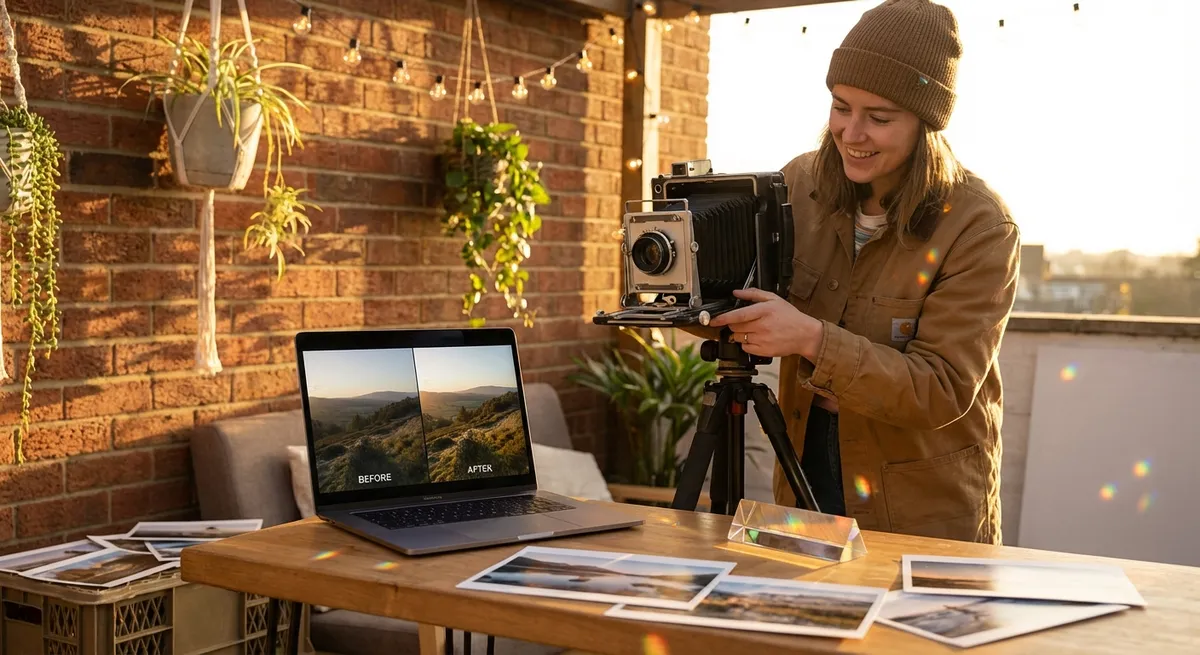
Photography doesn’t start when you open your editing app—and it doesn’t end when you press the shutter. The magic happens in the dance between how you shoot and how you edit. When you treat your camera and your editing tools as creative partners instead of separate steps, your images stop being “pretty good” and start feeling powerful, intentional, and unmistakably yours.
This guide is your creative roadmap: we’ll walk through practical camera settings, simple but effective techniques, and editing workflows—plus creative exercises that stretch your eye and your imagination.
Shoot With the Edit in Mind
Photographers who consistently create striking images usually do one thing differently: they think about the final edit before they take the shot. That doesn’t mean overplanning; it means giving yourself the raw material your future self will need.
Ask yourself before each shot: How do I want this image to feel? Moody? Airy? Cinematic? Clean? Your answer informs the way you expose, compose, and color your photo in-camera, so your edit becomes refinement—not rescue.
A few mindset shifts to try:
- Instead of “Does this look okay?” ask “What story am I hinting at here?”
- Instead of “I’ll fix it in post,” ask “What can I give myself now so that editing is fun, not a struggle?”
- Instead of chasing perfection, chase flexibility: clean focus, controlled highlights, and a clear subject.
When you shoot with the edit in mind, every adjustment later—contrast, color, crop—feels like finishing a sentence you started on location.
Essential Camera Settings for Edit-Friendly Photos
You don’t need the newest camera to create edit-ready images; you just need to feed your editor the best possible file. That starts with a few key settings.
1. Shoot RAW (or RAW + JPEG)
If your camera allows it, switch from JPEG-only to RAW (or RAW + JPEG).
- RAW files keep far more information in shadows, highlights, and colors.
- This gives you room to fix exposure mistakes and refine color without the image falling apart.
- On phones, apps like Adobe Lightroom Mobile, Halide, or ProCam can capture RAW (often called “DNG”).
If storage is a concern, use RAW for important shoots and JPEG for casual snaps. But for images you want to really develop, RAW is your best friend.
2. Expose to Protect Highlights
Blown-out highlights (pure white with no detail) are notoriously hard to recover. When in doubt:
- Slightly underexpose rather than overexpose, especially in bright scenes.
- Use your camera’s highlight alert (“blinkies”) or histogram if available.
- Aim for a histogram that doesn’t slam into the right edge—some breathing room in the highlights keeps skies, skin, and fabric looking natural in your edit.
Later, you can brighten shadows in your editing app, but you can’t rebuild details that never made it into the file.
3. Master the Exposure Triangle (with Editing in Mind)
Think of ISO, shutter speed, and aperture as three dials that also shape your future edit.
- ISO
- Keep it as low as you can for clean files (e.g., ISO 100–400 in good light).
- Higher ISO (e.g., 1600–6400) introduces more noise, which you can reduce in post—but at the cost of fine detail.
- Shutter speed
- For handheld, aim for at least
1 / (2× focal length)as a starting point (e.g., 1/100s for a 50mm lens). - For moving subjects, go faster: 1/500s or more to freeze motion, or slower (1/15s–1/4s with stabilization) for creative motion blur that looks great with contrasty edits.
- Aperture
- Wide apertures (f/1.4–f/2.8) create creamy backgrounds and isolate your subject; this works beautifully with subtle contrast and color grading in editing.
- Narrow apertures (f/8–f/16) keep more of the scene sharp—great for landscapes where you’ll later enhance texture and detail.
4. Set a Neutral White Balance
You can shift color temperature dramatically in post, but starting neutral gives you more control.
- Use Daylight, Cloudy, Tungsten, etc., instead of Auto when possible, so color stays consistent across a series.
- If you’re unsure, Auto WB is fine—RAW files let you fully adjust later.
- On phones, some camera apps let you manually set color temperature (e.g., 5200K for daylight, 3200K for tungsten).
This baseline neutrality helps your editing choices feel intentional, not like you’re fighting random color casts.
Technique Breakdowns: Shoot Smarter, Edit Easier
Great editing doesn’t rescue mediocre shots; it enhances thoughtful ones. Here are technique breakdowns that directly translate into stronger edits.
1. Use Light With Purpose
Soft light (cloudy days, window light) is forgiving and great for portraits.
- Aim for your subject to face the light at a slight angle.
- Expose for the skin; you’ll later refine contrast and color gently.
Hard light (midday sun, direct window) is dramatic and works well for graphic edits.
- Look for shadows with strong edges—stairs, blinds, architectural lines.
- Compose so shadows become shapes you can later deepen with contrast and clarity.
In your edit, you’re either enhancing the softness (muted contrast, gentle highlights) or leaning into the drama (high contrast, deep blacks). Know which one you’re going for before you hit the shutter.
2. Compose for Cropping Power
Even if you intend to frame perfectly in-camera, compose with room to breathe so you can crop creatively during editing.
- Leave a bit of space around your subject; social platforms often crop differently (4:5, 1:1, 16:9).
- Avoid placing key details at the very edge; give yourself trim margins to straighten horizons and adjust framing later.
- Think about negative space you can later darken, blur, or desaturate to make your subject pop.
Cropping is one of the most underrated editing tools—future you will thank present you for that extra bit of space.
3. Focus With Precision
No amount of sharpening can fix a missed focus.
- Use single-point autofocus and place it on the subject’s eye for portraits.
- For low light, increase ISO a stop instead of slowing shutter too much; motion blur is harder to fix than luminance noise.
- Take a short burst of frames in critical moments; later in editing, pick the sharpest, best expression.
Sharp focus gives you confidence to push clarity, texture, and local contrast without your image falling apart.
A Simple, Powerful Editing Workflow
Whether you’re using Lightroom, Capture One, Snapseed, VSCO, or another app, a solid workflow keeps your edits consistent and efficient. Try this order and adapt it to your tools.
1. Start With the Global Foundation
Begin with adjustments that affect the whole image:
Crop & Straighten
- Level horizons, align vertical lines, and refine framing to emphasize your subject.
Exposure & Contrast
- Adjust exposure for overall brightness. - Use Contrast, Highlights, and Shadows to get a balanced yet punchy base.
Whites & Blacks (Tone)
- Nudge Whites up for luminosity; pull Blacks down for depth. - Watch your histogram to avoid clipping important details.
White Balance & Tint
- Adjust Temperature (cooler or warmer) and Tint (green–magenta) for the mood you want. - Skin tones are a great reference—if they look good, the rest usually follows.
2. Shape With Presence and Detail
Once your base looks solid, add dimensionality:
- Clarity / Structure: Adds midtone contrast; use lightly, especially on faces.
- Texture: Enhances fine detail (fabric, foliage, architecture) without as much harshness.
- Vibrance & Saturation:
- Vibrance boosts muted colors more than already-bright ones; it’s usually safer.
- Saturation alters all colors equally; use sparingly to avoid cartoonish looks.
A good test: if your photo looks “edited” before someone notices the subject, dial it back.
3. Fine-Tune Color With HSL
The HSL panel (Hue, Saturation, Luminance) is where your style really starts to emerge.
- Hue: Shift colors’ character (e.g., push greens toward teal, or oranges toward richer gold).
- Saturation: Decide which colors are bold and which fade into the background.
- Luminance: Lighten or darken specific colors to guide the viewer’s eye (e.g., brighten oranges to lift skin, darken blues to deepen a sky).
This is a powerful place to create a consistent “look” across multiple images.
4. Local Adjustments: Paint the Light
Selective edits let you emphasize the story within the frame:
- Radial filters to brighten a subject’s face slightly or add a soft vignette.
- Linear gradients to darken the sky, lift foreground detail, or control window light.
- Brush tools to lift shadow on a face, add detail to eyes, or soften harsh skin texture.
Think of local adjustments like stage lighting: you’re not changing the scene—you’re directing the audience’s attention.
Creative Exercises to Grow Your Editing Eye
Deliberate practice transforms both your shooting and editing. These exercises are short, focused, and designed to challenge how you see.
Exercise 1: One Scene, Three Moods
Goal: Learn how editing changes emotion.
- Find a simple scene: a window, a corner of your room, a cafe table, a single tree.
- Take 3–5 well-exposed, slightly underexposed RAW shots with stable composition.
Edit the same file three ways:
- Light & Airy: Lift exposure, raise shadows, lower contrast slightly, soften blacks, warm white balance. - Moody & Dramatic: Darken exposure slightly, deepen blacks, lower shadows, keep highlights controlled, cooler or split-toned colors. - Bold & Vibrant: Strong contrast, rich saturation, clean whites and blacks, moderate clarity.
Compare them side by side. Note which changes most alter the mood: is it color, contrast, brightness, or something else?
Exercise 2: The 10-Minute Edit Limit
Goal: Strengthen your instincts and avoid over-editing.
- Select 5 recent photos you like but never edited.
- For each, set a 10-minute timer.
Within that time:
- Do basic crop/straighten, exposure, white balance. - Make one or two creative choices (e.g., cooler WB, soft fade, punchy contrast). 4. When the timer ends, stop—even if it’s not “perfect.”
Later, revisit your edits without a timer. You’ll start to see which core moves matter most and where you tend to overwork images.
Exercise 3: Shoot a “Flat” Edit-Friendly Set
Goal: Learn to shoot specifically for editing flexibility.
- Choose a short walk or a single room.
Set your camera to:
- RAW - Slightly underexpose by about 1/3–2/3 stop - Neutral picture style / profile 3. As you shoot, avoid blown highlights; prioritize clean focus and composed frames with breathing room.
Back at your editor, push each file:
- Lift shadows and exposure. - Experiment with bold color grading. - Check where noise and banding appear—that’s your personal limit.
You’ll quickly learn how far your camera (or phone) files can be stretched, and that knowledge will inform how you shoot in the future.
Conclusion
Every unforgettable image is a collaboration between the moment you capture and the care you give it afterward. When you shoot with intention—protecting highlights, sharpening your composition, and thinking ahead to color and mood—you give your future self the gift of creative freedom in the edit.
Editing isn’t about hiding flaws or cloning your work to match someone else’s feed; it’s about translating how the scene felt into how the photo looks. The more you experiment—testing different moods, pushing and pulling light, playing with color—the more your own visual voice emerges.
Keep shooting. Keep editing. Let your curiosity lead, and let each image be a small step toward the portfolio you haven’t even imagined yet. SnapFresco is simply your canvas; your vision does the rest.
Sources
- [Adobe Lightroom Classic User Guide](https://helpx.adobe.com/lightroom-classic/user-guide.html) - Detailed reference for exposure, tone curves, HSL, and local adjustments in Lightroom, applicable conceptually to many editors
- [Nikon Learn & Explore: Understanding the Exposure Triangle](https://www.nikonusa.com/en/learn-and-explore/a/tips-and-techniques/understanding-exposure.html) - Clear explanation of how ISO, shutter speed, and aperture interact
- [Cambridge in Colour: Understanding Digital Camera Histograms](https://www.cambridgeincolour.com/tutorials/histograms1.htm) - In-depth guide to reading histograms and protecting highlights
- [Harvard Digital Photography Course Materials](https://cs50.harvard.edu/x/2020/project/5/) - Includes foundational photography and editing concepts used in educational settings
- [National Park Service Night Sky Photography Tips](https://www.nps.gov/articles/astro-photo-tips.htm) - Practical exposure and technique advice that translates well to shooting for flexible edits in low light